
openITCOCKPIT version 5.8.0 has been released!
Security fixes
This release includes important security fixes addressing Container Permission logic issues. An attacker could send malicious container configurations, which would required to restore the container tree from a backup.
WebSocket Event Stream
openITCOCKPIT 5.8.0 now provides a WebSocket Event Stream, allowing real-time access to monitoring events and notifications. This can be particularly useful for automation purposes and is a convenient way to process monitoring events with external tools like Node-RED. Please see the documentation for more details.
Statusengine 4
openITCOCKPIT has updated from Statusengine 3 to Statusengine 4. Statusengine is a background component responsible for processing monitoring events and storing the results into the database. It also provides an API to pass external commands to the monitoring core. It’s nothing an end-user of openITCOCKPIT would typically interact with directly.
Statusengine 4 is a re-implementation of the previous version, designed to improve performance and scalability. To achieve this, the underlying programming language has changed from PHP to Go, which allows for more efficient processing of monitoring events.
Warnings during the update
During the update of openITCOCKPIT, you may see the following warning messages:
dpkg: warning: while removing openitcockpit-statusengine3-worker, directory '/opt/openitc/statusengine3/worker/etc' not empty so not removed
dpkg: warning: while removing openitcockpit-statusengine3-worker, directory '/opt/openitc/etc/statusengine' not empty so not removed

Warning: The unit file, source configuration file or drop-ins of statusengine.service changed on disk. Run 'systemctl daemon-reload' to reload units.
Messages like this are normal and expected and can be ignored.
Breaking Changes for Docker Users
If you are using the Docker version of openITCOCKPIT, you should update the openitcockpit.env file first before updating the Docker containers.
Stop your contains, and make sure to set OITC_DB_BACKEND=Statusengine4, if the line is commented out, you should still update the value, but leave it commented.
All old Statusengine 3 related environment variables starting with SE_ are not longer relevant. Usually there are no modifications required to run openITCOCKPIT.
How ever, you should add the new variables introduced for Statusengine 4 to your openitcockpit.env file.
By default, all options are commented out. The value is the default one used by Statusengine 4.
#####
## Statusengine Worker Go Environment Variables
## Docs: https://github.com/statusengine/statusengine-worker
#####
#STATUSENGINE_CONSUMER=gearman
#STATUSENGINE_GEARMAN_ADDR="gearmand:4730"
#STATUSENGINE_GEARMAN_MAX_CONCURRENT_JOBS_PER_QUEUE=1
###STATUSENGINE_RABBITMQ_URL="amqp://user:password@rabbitmq:5672/"
###STATUSENGINE_RABBITMQ_PREFETCH=100
#STATUSENGINE_MYSQL_DSN="openitcockpit:openitcockpit_password@tcp(mysql:3306)/openitcockpit?parseTime=true"
#STATUSENGINE_MYSQL_MAX_OPEN_CONNS=25
#STATUSENGINE_MYSQL_BATCH_SIZE=500
#STATUSENGINE_GRAPHITE_BATCH_SIZE=100
#STATUSENGINE_LISTEN_ADDR=":8091"
#STATUSENGINE_METRICS_LISTEN_ADDR=":9105"
#STATUSENGINE_COMMAND_LISTEN_ADDR=":8092"
#STATUSENGINE_GRAPHITE_ADDR="carbon-c-relay:2003"
#STATUSENGINE_GRAPHITE_PREFIX=openitcockpit
#STATUSENGINE_PERFDATA_ROUTE=graphite
#STATUSENGINE_NODENAME=openITCOCKPIT
#STATUSENGINE_API_KEYS=""
#STATUSENGINE_API_COMMAND_KEYS=""
#ENABLE_OPENITCOCKPIT_TWEAKS=true
#STATUSENGINE_STATUS_MAX_AGE="5m"
#STATUSENGINE_LOG_LEVEL=info
#STATUSENGINE_LOG_FORMAT=text
#
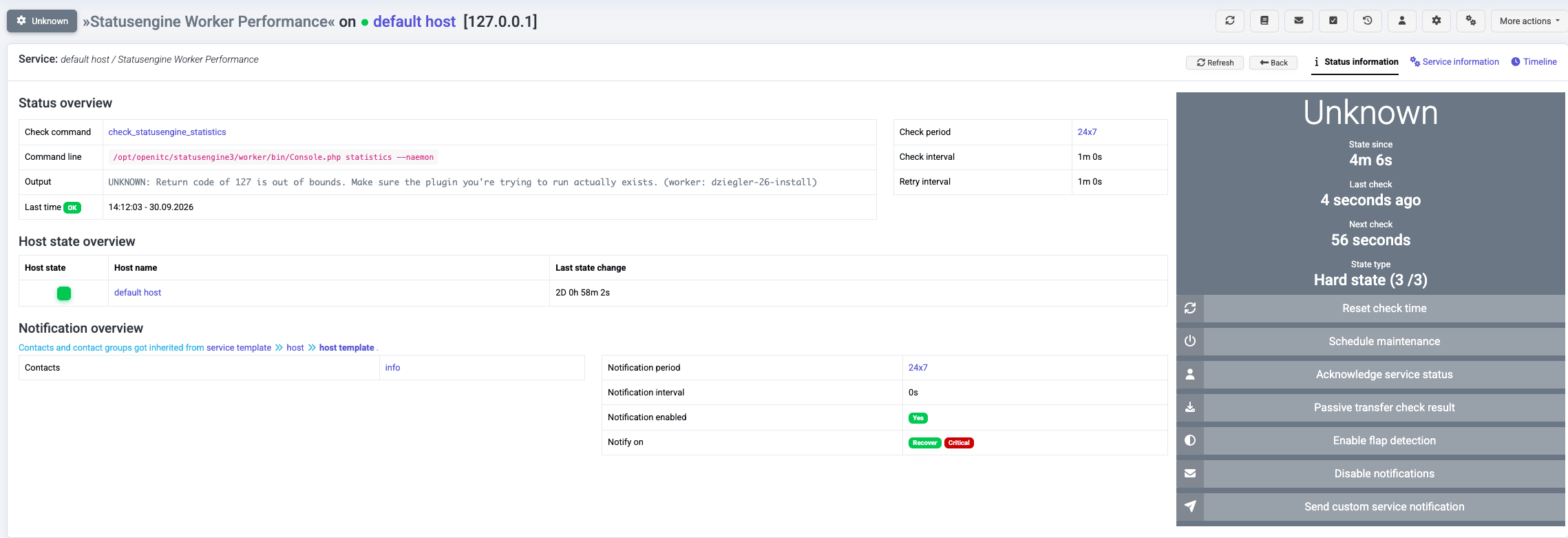
Check Statusengine Worker Performance is obsolete
The Statusengine Worker Performance check has become obsolete with Statusengine 4 as Statusengine 4 now provides internal
statistics via a Prometheus Exporter.
openITCOCKPIT will create the new exporter automatically, if the Prometheus Module is installed. The Statusengine Worker Performance
check will no longer provide any useful information and has to be removed from existing monitoring configurations.
Host and Service Operations Summary Widgets
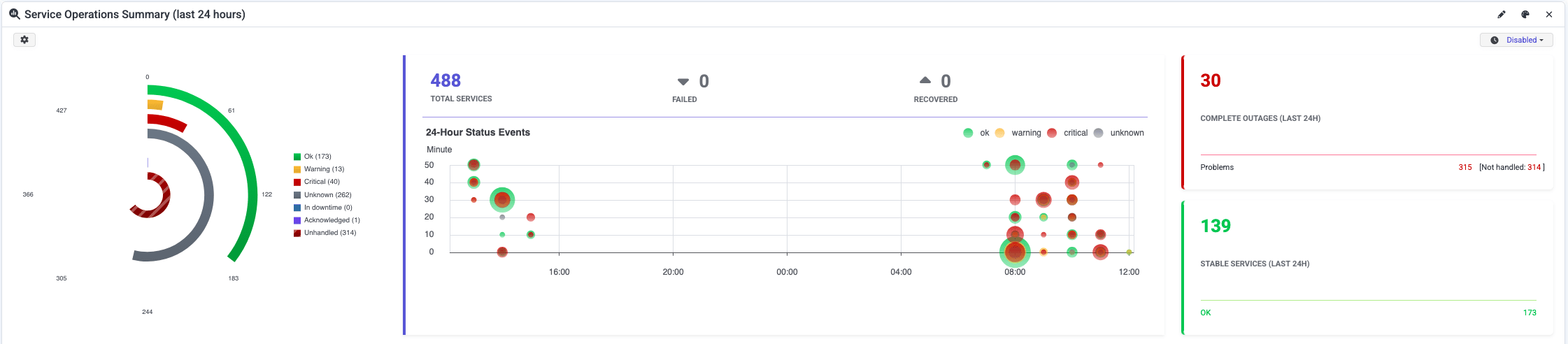
We added a new Widget to the dashboard, that shows an overview of the current state of all hosts and services, including state change events in the last 24 hours. In addition, the widget has the number of hosts or services where no state change has occurred in the last 24 hours. In case hosts and services have tags assigned, the widget will display a accumulated state for each tag.
Eventcorrelation Module: Option to overwrite a state with an acknowledgement
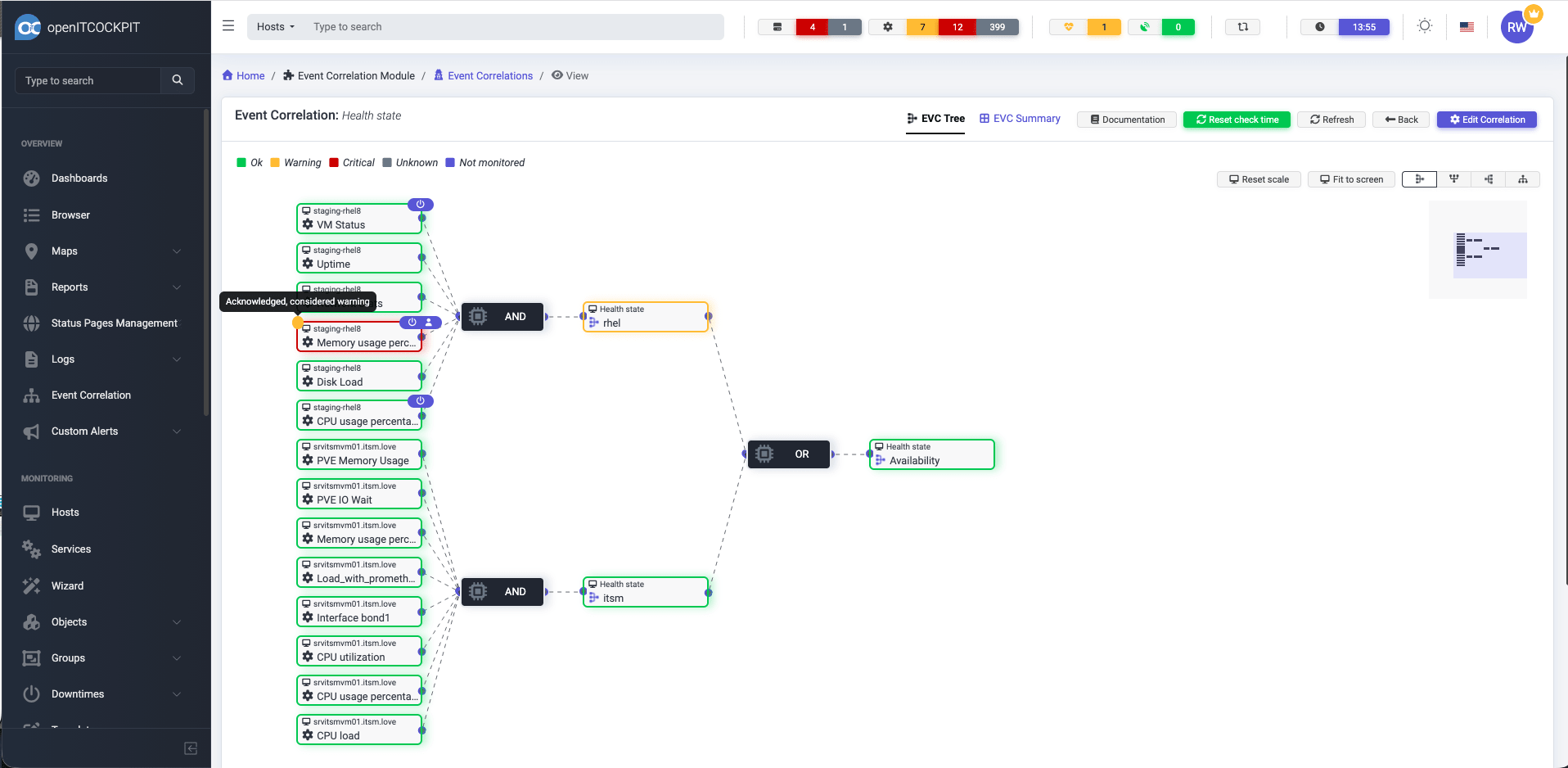
In the Eventcorrelation Module, it is not possible to overrule the state of an service with an acknowledgement. By default this option is disabled to not affect the current behavior.
You can find this option under: System Configuration -> System -> Event Correlation Globals: Status for acknowledged service.
This option works similar as the already existing option for downtimes. In case a service is in downtime and acknowledged, an acknowledgement will override the downtime status.
First Notification Time Hints in Host and Service Escalations
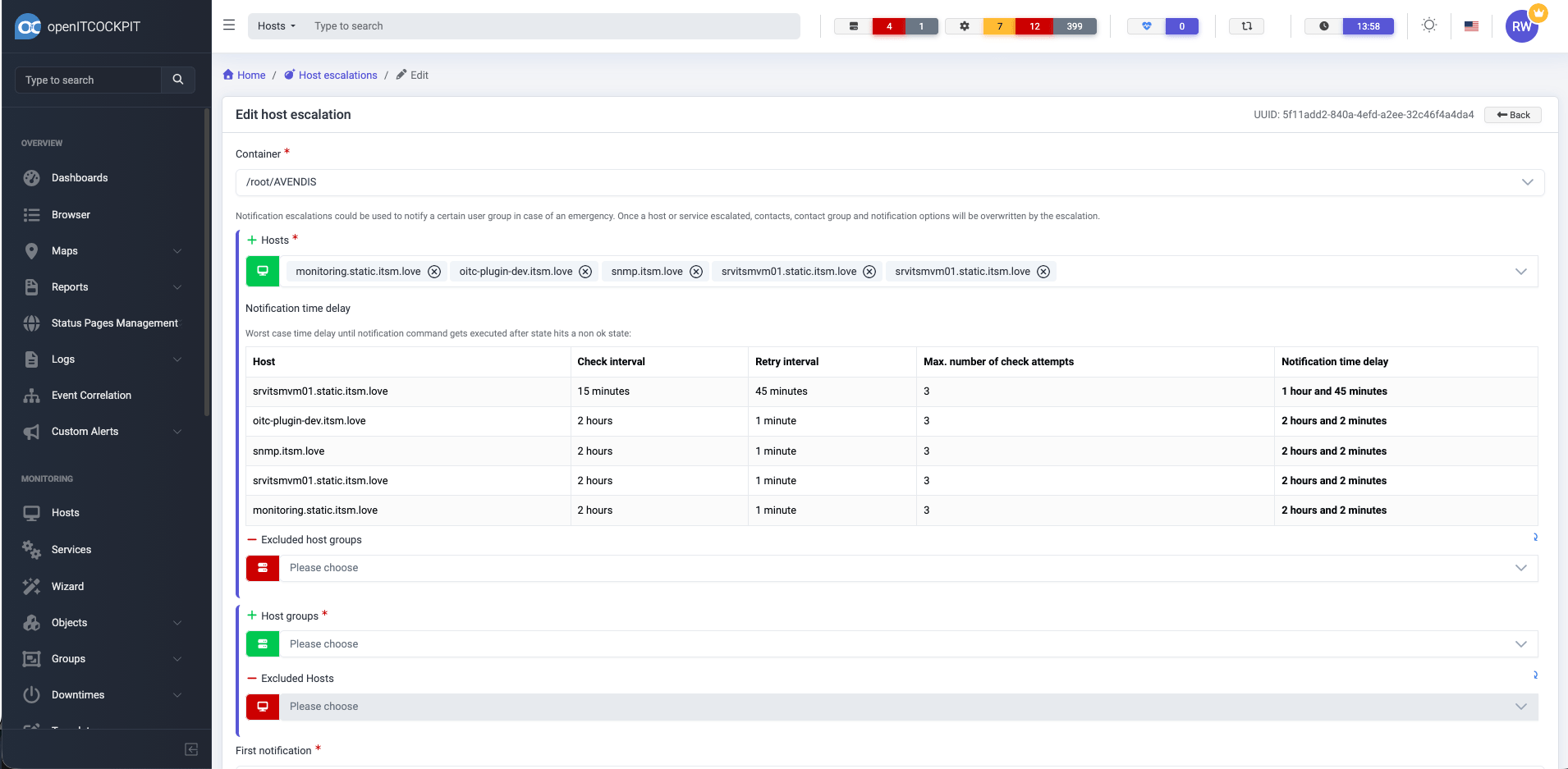
Setup Host and Service Escalations can be tricky. Who should be notified first? When should an escalation be triggered? To help with the configuration openITCOCKPIT will now show the notification configuration and check intervals for each host and service directly in a tabular overview.
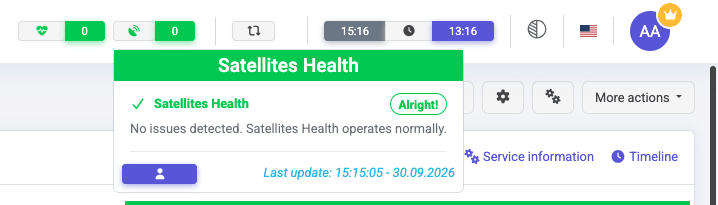
Satellite Health Overview
This feature was inspired by the “System Health Overview”. It shows a general overview about all connected satellite systems. As long as all systems are operational, the overview will indicate a healthy status for the satellite systems.
In case of an issue, depending on the severity, the status will change to warning or critical.
PHP 8.1
As mentioned in our last blog post we have dropped support for PHP 8.1. In case you are an Enterprise Linux user, please make sure you have updated your system to PHP 8.3 before updating openITCOCKPIT.
To update PHP on Enterprise Linux (RHEL, AlmaLinux, Rocky Linux), please see our instructions:
In case you are using Debian or Ubuntu, please see our official upgrade instructions for these distributions:
- Upgrade Ubuntu Jammy (22.04) to Ubuntu Noble (24.04)
- Upgrade from Debian Bookworm (12) to Debian Trixie (13)
Downgrade of MySQL to the latest LTS version (Grafana only)
The openITCOCKPIT Graphing Stack is using a own MySQL instance for Grafana, which is running as a Docker container. Unfortunately, with openITCOCKPIT 5.7.0 we shipped a non LTS version of MySQL (26.7.0) which has to be downgraded to the LTS version (9.7.1).
The downgrade will be handled automatically, so manual action required. However, Grafana will not show any Dashboards until the openITCOCKPIT cronjob has recreated all dashboards. In case you do not see any dashboards, you can force a refresh by execute the following commands:
openitcockpit-update
oitc cronjobs -f
This change will only affect the MySQL instance used by Grafana. The MySQL database of openITCOCKPIT itself will remain untouched.
Changelog
For a complete list of new features, bug fixes, and improvements, please see the changelog.
How to Update
Please see the official documentation for instructions on how to update openITCOCKPIT.
Refresh of monitoring configuration
After updating openITCOCKPIT, it is recommended to refresh your monitoring configuration to ensure all changes are applied correctly.
Your openITCOCKPIT Team