openITCOCKPIT version 5.7.0 has been released! Packed with new features, such as grouping for Statuspages, a new host dependency tree, a new WebSocket backend, security updates and much more.
Security fixes
We discovered and fixed several security vulnerabilities. An attacker was able to assign it’s account to another user group which
could grant themselves elevated privileges. This affected the Master System and the Satellite Systems. In addition, we improved our Cookie handling.
openITCOCKPIT will not enforce SameSite=Lax for cookies.
Dropped Support for Ubuntu 22.04, Debian 12 and PHP 8.1
As mentioned in our last blog post we had to drop support for Ubuntu Jammy 22.04, Debian Bookworm 12 and PHP 8.1 in this release. This step is necessary as PHP 8.1 does not get security updates for more than 8 months by the time of writing this blog post. Unfortunately, this means that continuing to support Ubuntu 22.04 until its end of life in April 2027 would hold back the development of openITCOCKPIT for all users.
Please see our official upgrade instructions if you are still using an older release.
- Update Ubuntu Jammy (22.04) to Ubuntu Noble (24.04)
- Upgrade from Debian Bookworm (12) to Debian Trixie (13)
Please notice: Changing the PHP version through a third-party repository is not supported and will break the system.
In case you are using Enterprise Linux (RHEL, AlmaLinux, Rocky Linux), please see our instructions:
Statuspages: Add grouping and auto-refresh options
Objects on a Statuspage can now be grouped together by identifiers. One object can be part of multiple groups, and will be displayed multiple times. To configure groups, you have to edit the Statuspage and add one or more identifiers to the respective objects.

The grouping will be displayed on the Statuspage, allowing users to easily see which objects belongs together. The worst state will be displayed on top of the Statuspage.
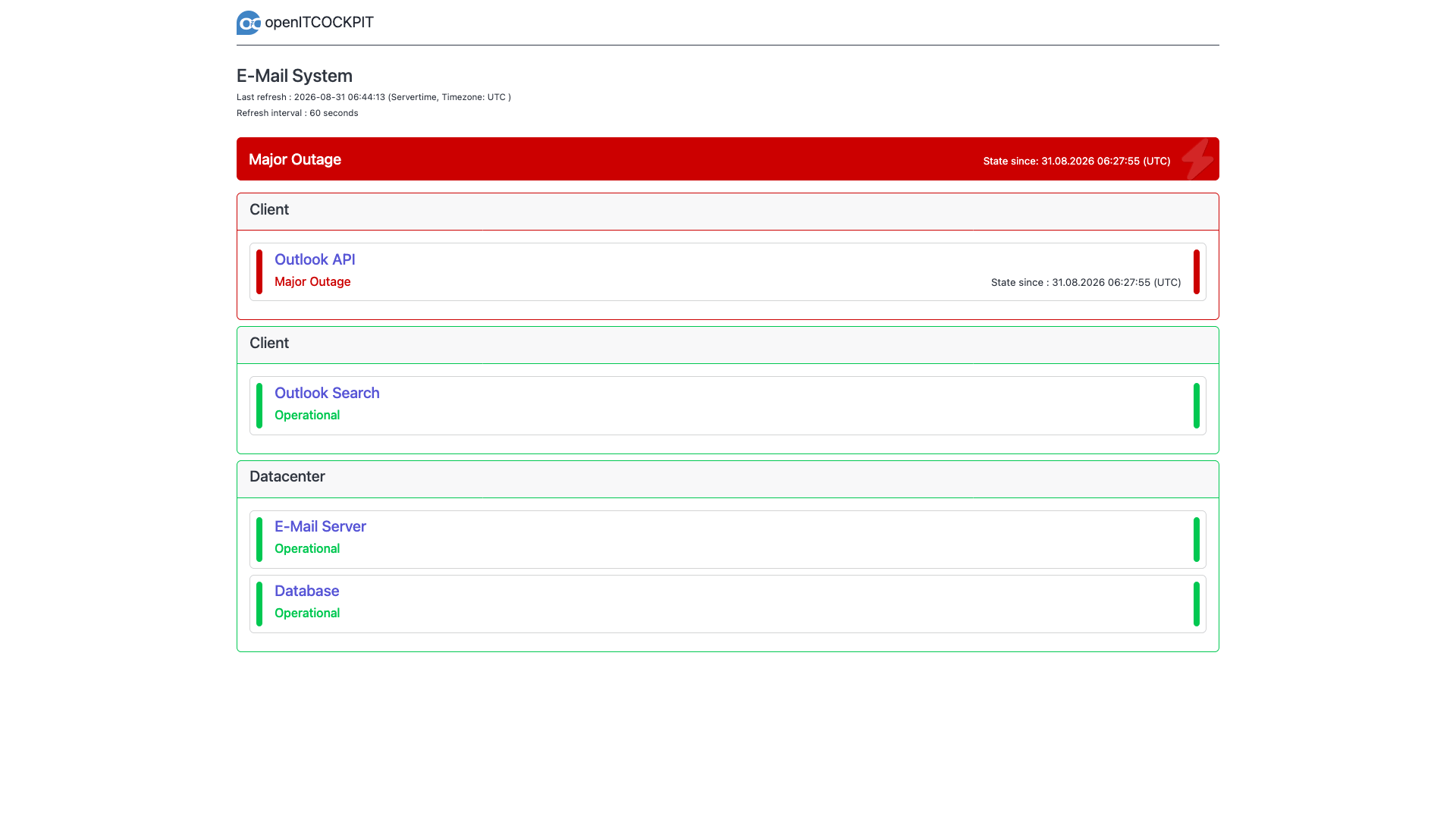
Statuspages now also have an auto-refresh option, which allows the page to automatically update at regular intervals without requiring a manual reload. This ensures that users always see the most current status information, for example if the Statuspage is displayed on a public screen. Statuspages will now also display since when a particular object has been in its current state.
MapModule: Add support for Statuspages and Statuspagegroups
The MapModule now supports displaying Statuspages and Statuspagegroups on the map. This allows for a more comprehensive visualization of the status of various components within your infrastructure. You can easily identify the health and status of different groups and individual objects directly from the map view.
LDAP: Automatically import users from LDAP
This feature allows openITCOCKPIT to automatically import users from an LDAP or Active Directory server. It simplifies user management by automatically adding new users to openITCOCKPIT. Permissions will be granted based on a “LDAP User Default” you can configure based on LDAP Groups.
The setup is documented in the official openITCOCKPIT documentation: Automatic Importing of Users from LDAP
MCP Server for AI integrations
openITCOCKPIT now provides an MCP server that can be used for AI-driven features and integrations. This allows for enhanced automation and intelligent processing within the openITCOCKPIT ecosystem. You can use any AI model you prefer with the MCP server. By default, the MCP Server will only allow read operations. In case you want to create or update objects, such as creating new hosts and services, you have to set OITC_ENABLE_WRITE_TOOLS=true.
The openITCOCKPIT MCP Server is free to use and provided as Docker container. You can pull the Docker image from Docker Hub and run it with your preferred configuration. Please see the Container Readme for more details.
The source code of the MCP Server is available on GitHub: openITCOCKPIT MCP Server (source). Please feel free to create an issue or submit a Pull Request.
New API documentation
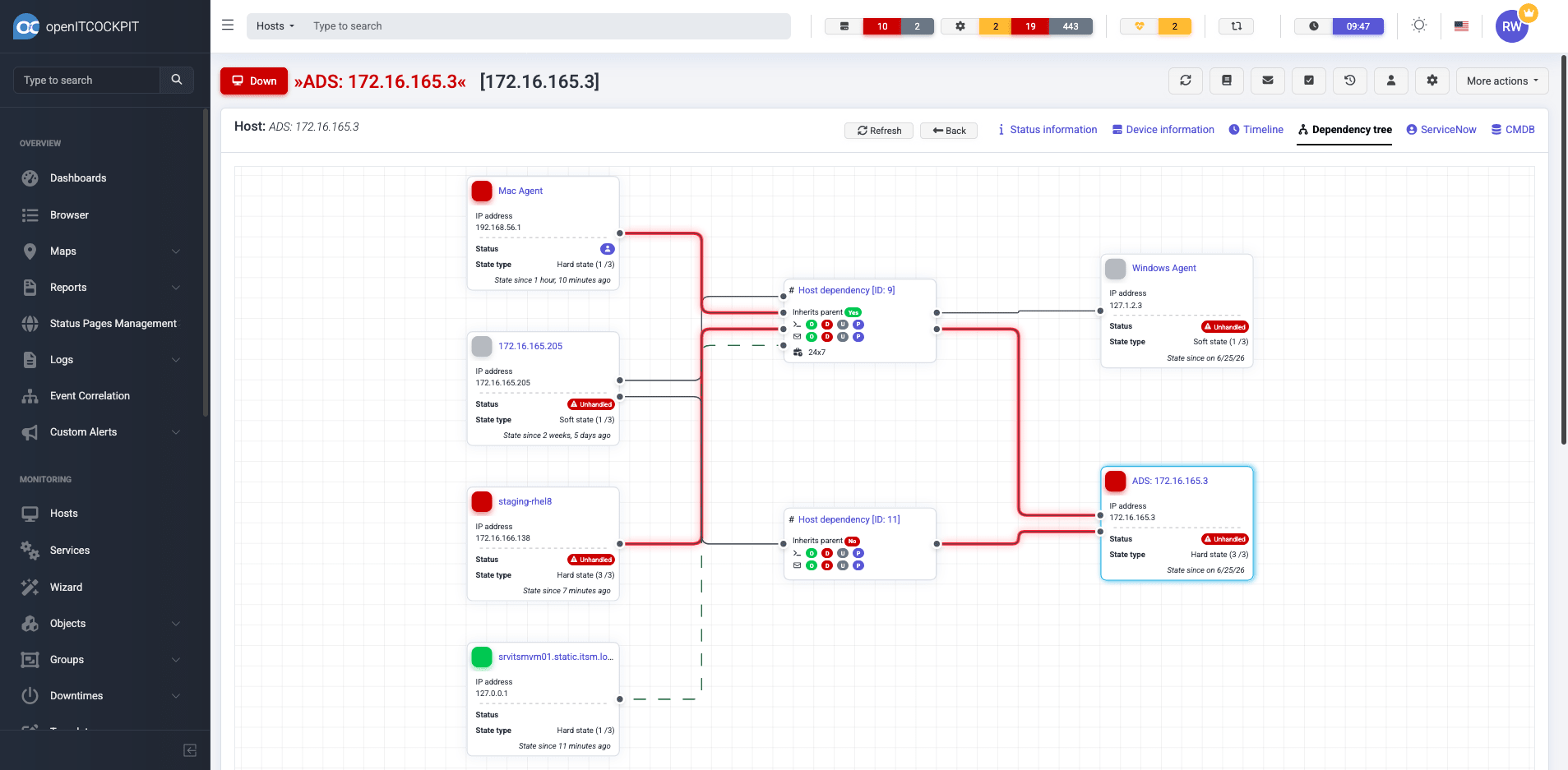
We published a massive update to the openITCOCKPIT API documentation, which includes now over 900 endpoints and detailed usage examples. You can access the updated API documentation at: https://openitcockpit.io/api/ The API documentation is connected to our Public Demo System, allowing you to try out the API endpoints directly.
The source code is also available on GitHub: openITCOCKPIT API (source).
New Host Dependencies View
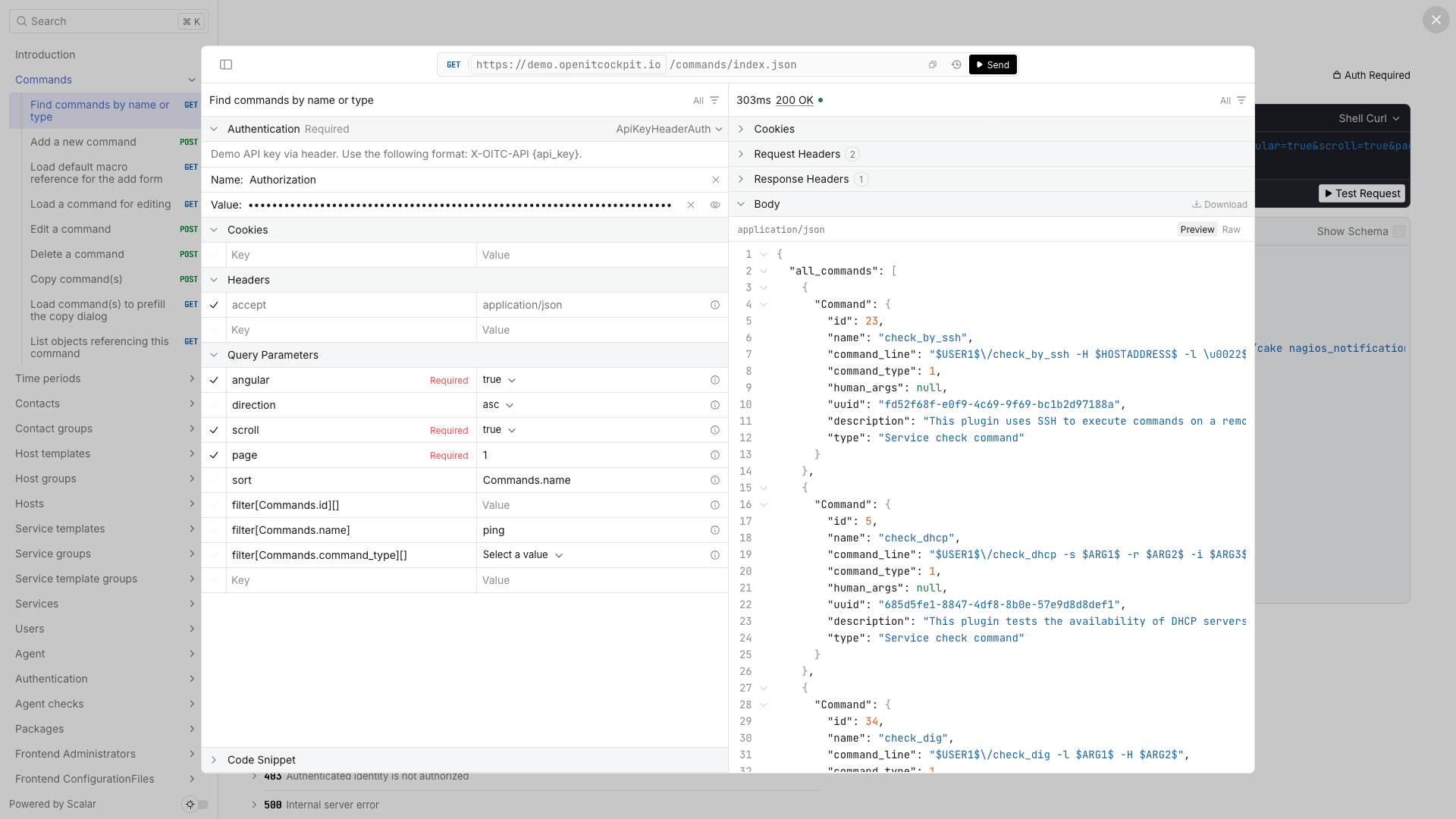
The Details view of a Host (Browser View) got a new “Dependency Tree” Tab, which provides a visual representation of the host’s dependencies, making it easier to understand the relationships and impact of each host within the network. The current host is highlighted in the tree.
On the left side of an Dependency, all parent hosts are displayed. On the right side, all dependent child hosts are displayed. The line connecting the nodes represents the current state. The dashed green line indicates a healthy dependency. A red or gray line indicates a problematic or unknown dependency.
Filter allocations
While it was possible to save and share your filter, it is now also possible to allocate a set of pre-defined filters to users and entire user groups. This allows administrators to ensure that users have quick access to the most relevant filters, improving efficiency and consistency across the platform.
Satellite Interface: Add Option to set custom background image in login screen
On satellite systems it is now possible to set a custom background image and logo on the login screen of openITCOCKPIT.
The corresponding settings can be found in the interface.yml
# Enforce the usage of a custom login background image
# Values: 0 and 1
use_custom_login_background: 0

# Image used as background on the Login Screen
# Relative path of the webroot
custom_login_background: /img/custom-login-background.png

New Server-Side Chart Rendering
Most of the Charts and Dashboards you see in openITCOCKPIT are based on JavaScript and rendered client-side in the user’s browser. This is convenient for interactive dashboards with tooltips, zoom capabilities and real-time updates.
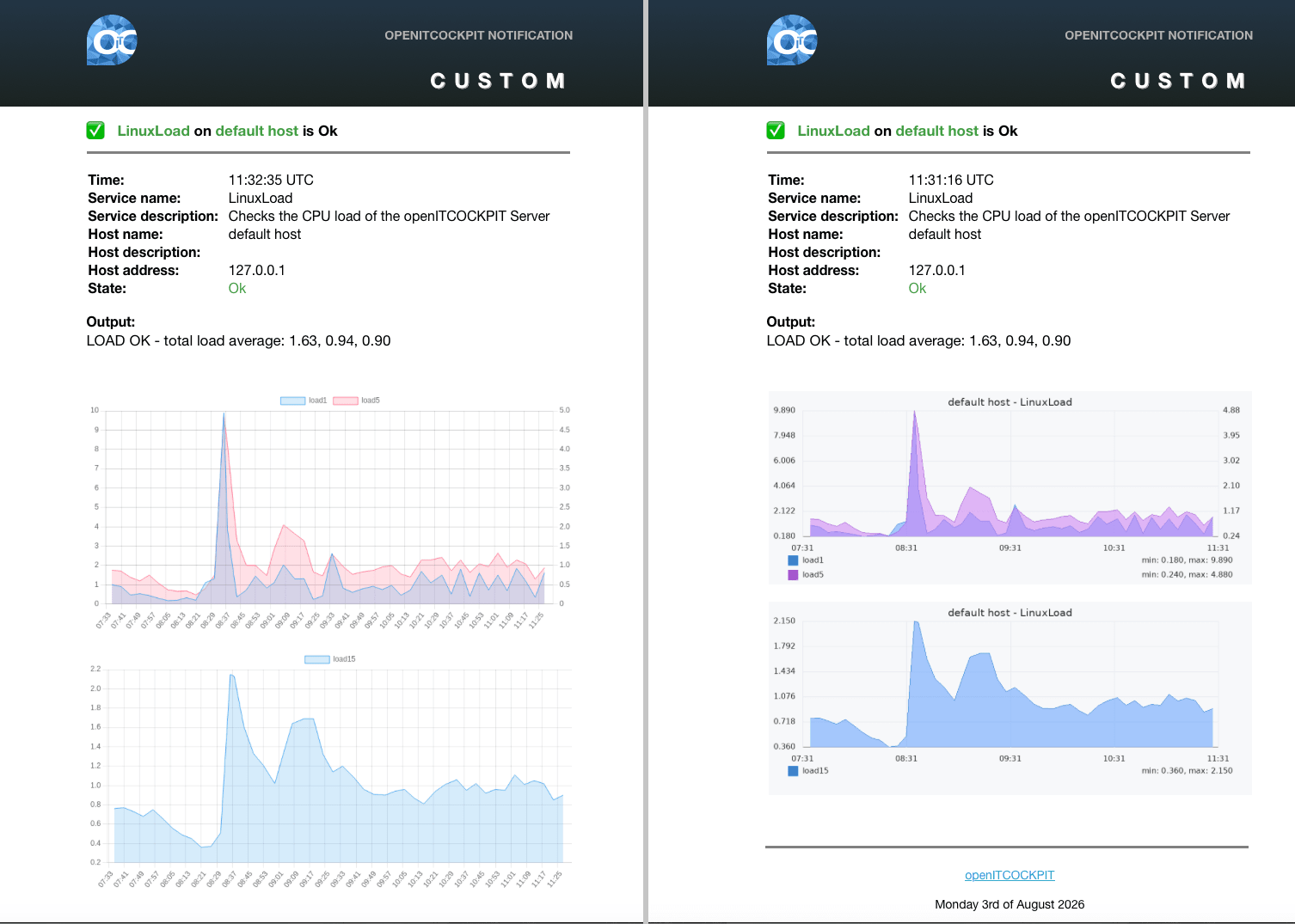
However, openITCOCKPIT also need a method to provide service-side rendered charts and graphs for PDF exports or E-Mail attachments. In the past, we used Puppeteer to render charts server-side, but this approach had limitations in terms of performance and resource usage. Basically for every chart that needed to be rendered server-side, a new Chromium instance had to be started.
The look of the server-side rendered charts is may a bit different than it was before, but the performance benefits are significant.
For example the generation of an Autoreport took ~3 Minutes before, but with the new charts, openITCOCKPIT can generate the same report in less than 3 seconds. The file size per image got reduced by ~55%, which also reduced the size of alert emails or PDF reports.
The following image illustrates the difference between the old server-side rendered charts (left) and the new server-side rendered charts (right).
ImportModule: Log start and end time of importers
Imports will now report the last start and end time. Also if the last import was successful or failed. Especially for users who rely on automated imports, this provides better visibility if an importer fails or does not get scheduled at all.

In addition, the package openitcockpit-enterprise-plugins provides a check plugin, to monitor the state of one or more imports and the last execution time.
$ /opt/openitc/nagios/libexec/check_oitc_importerscheck_oitc_importers --help
usage: check_oitc_importers [-h] [-w WARNING] [-c CRITICAL] [-V] [-v] --mode MODE [--mycnf MYCNF] [--importer-ids IMPORTER_IDS] [--unit {seconds,minutes,hours}]

Plugin to monitor the status of openITCOCKPITs importers of the Import Module

options:
  -h, --help            show this help message and exit
  -w WARNING, --warning WARNING
                        Warning threshold in selected unit (--unit)
  -c CRITICAL, --critical CRITICAL
                        Critical threshold in selected unit (--unit)
  -V, --version         show program's version number and exit
  -v, --verbose         Verbose output
  --mode MODE           Select mode check_duration, check_last_starttime
  --mycnf MYCNF         Path to the mysql.cnf file to use for connecting to the database
  --importer-ids IMPORTER_IDS
                        Comma-separated importer IDs, e.g. 1,2,3. If omitted, all importers are used.
  --unit {seconds,minutes,hours}
                        Unit for --warning/--critical: seconds, minutes or hours (default: seconds)
Dashboard: New cylinder widget
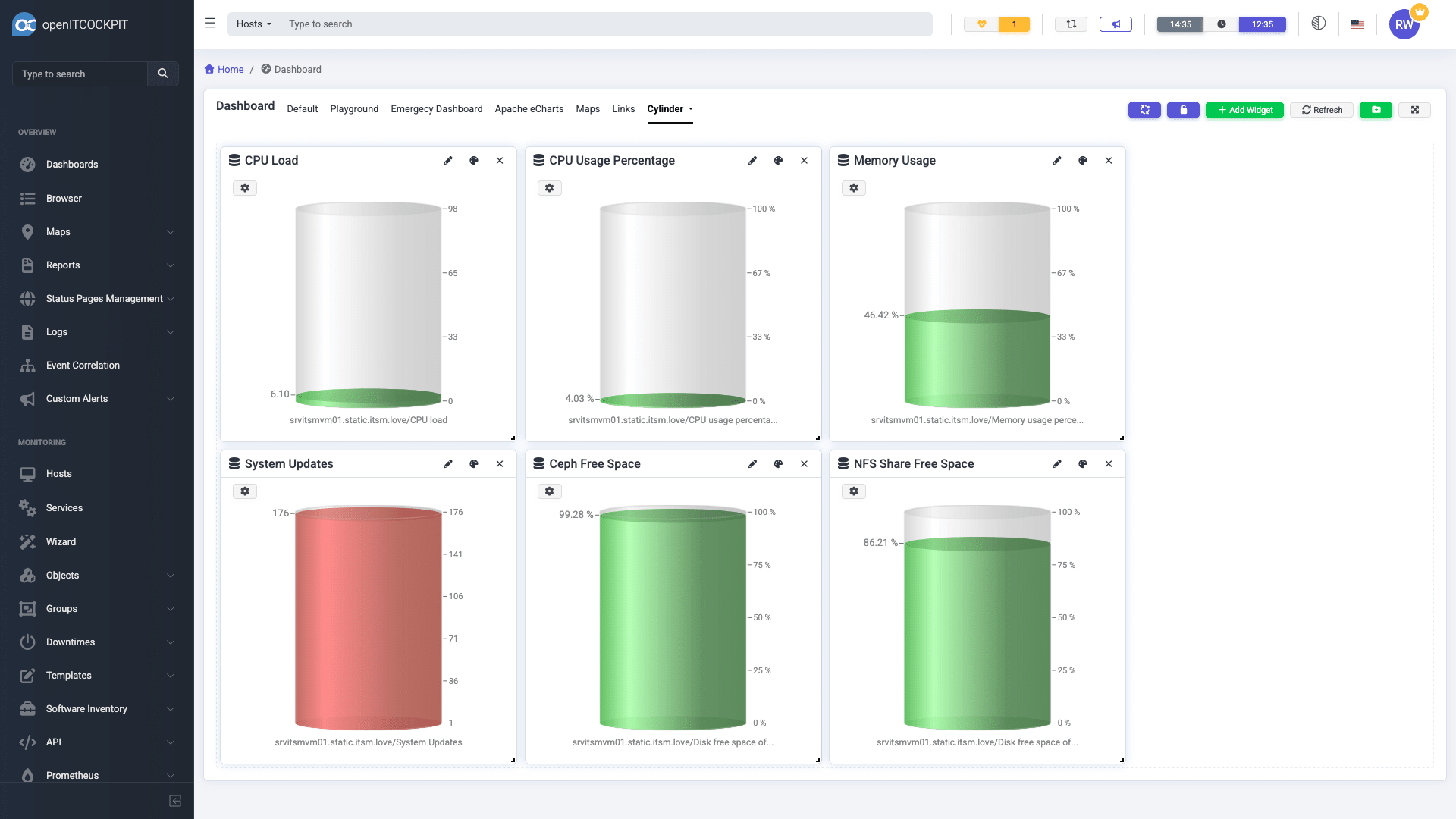
The Dashboard of openITCOCKPIT now includes a new cylinder widget, which can visualize various metrics. While every metric can be displayed it is recommended to use metrics that provide a minimum and maximum value or percentage values for better results.
New WebSocket Backend
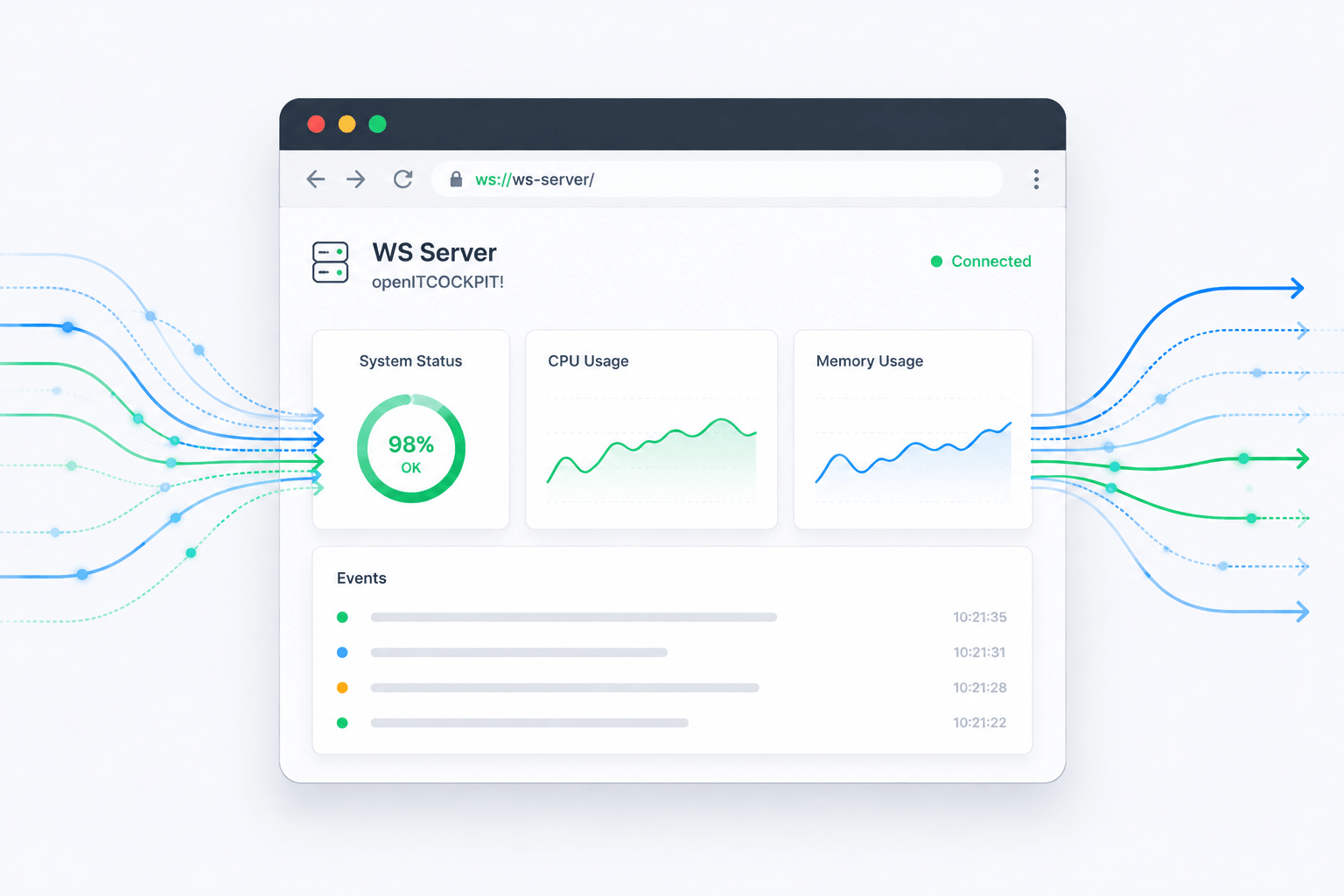
In the past, openITCOCKPIT used a PHP based WebSocket server built on top of Ratchet, which had limitations in terms of performance and security. The used WebSocket implementation in openITCOCKPIT hasn’t been changed much since openITCOCKPIT 3.x, so we decided to do a complete rewrite of the WebSocket backend using Go, a modern programming language known for its performance and concurrency capabilities.
The new WebSocket backend is used, to send Push Notifications to Web-Browsers, the openITCOCKPIT Desktop App and the iOS / Android App.
The update process of openITCOCKPIT should automatically migrate your configuration to use the new WebSocket server. If you encounter any issues, please make sure to check the notification commands on your system. The should look exactly like this:
host-notify-by-browser-notification
$USER1$/send_push_notification --type Host --notificationtype $NOTIFICATIONTYPE$ --hostuuid "$HOSTNAME$" --state "$HOSTSTATEID$" --output "$HOSTOUTPUT$" --ackauthor "$NOTIFICATIONAUTHOR$" --ackcomment "$NOTIFICATIONCOMMENT$" --user-id $_CONTACTOITCUSERID$
service-notify-by-browser-notification
$USER1$/send_push_notification --type service --notificationtype $NOTIFICATIONTYPE$ --hostuuid "$HOSTNAME$" --serviceuuid "$SERVICEDESC$" --state "$SERVICESTATEID$" --output "$SERVICEOUTPUT$" --ackauthor "$NOTIFICATIONAUTHOR$" --ackcomment "$NOTIFICATIONCOMMENT$" --user-id $_CONTACTOITCUSERID$
We have also changed the message format used by the Websocket Server. The format was never documented publicly (except via the source code) and the WebSocket API was never built to be used by external clients directly. It is intended for internal communication within openITCOCKPIT and the Desktop and Mobile Apps only.
The source code is available on GitHub: openITCOCKPIT WebSocket (source).
Microsoft Teams Module: AdaptiveCard Version
The Microsoft Teams Module now uses AdaptiveCard version 1.4 for its message formatting, ensuring better compatibility. In the past, openITCOCKPIT used AdaptiveCard version 1.6, which sometimes caused display issues.
In case you have any issues after the update, please let us know!
The AdaptiveCard version is defined in the file /opt/openitc/frontend/plugins/MSTeamsModule/src/Command/TeamsNotificationCommand.php on line 213 and 471. To change the version, you can modify these lines accordingly.
'version' => '1.4', // Change AdaptiveCard version from 1.4 to 1.6 in case you have issues
openITCOCKPIT Mobile App
Did you know that openITCOCKPIT is also available as a mobile app for iOS (and Android very soon)? In case you missed it, you can download the app from the Apple App Store. More information is available at the openITCOCKPIT Mobile App documentation. The app is free and can be used with the Community and Enterprise edition.
Changelog
For a complete list of new features, bug fixes, and improvements, please see the changelog.
How to Update
Please see the official documentation for instructions on how to update openITCOCKPIT.
Your openITCOCKPIT Team