
openITCOCKPIT version 5.9.0 has been released!
PHP vulnerabilities
As mentioned in the PHP security advisories, there are critical vulnerabilities that need to be addressed immediately.
Patches are available for Ubuntu, Debian and RHEL. Please make sure to install the latest security updates as soon as possible.
Show actual duration of Downtimes
Downtimes in openITCOCKPIT start and end at specific times, and have a fixed duration. How ever, a user may cancel a downtime, or it may start later than scheduled,
for example if a user schedule a downtime with a start date in the past, or in case the monitoring engine is not running at the scheduled start time.
While openITCOCKPIT tracks the schedule time and the actual time for a long time already, it never displayed the values to the user.
With this release, openITCOCKPIT will also show the actual start time, end time and the actual duration, in case it differs from the scheduled times.
In the details view of hosts and services, the actual start time is now displayed:

Also in the overview lists of all downtimes:

System Health
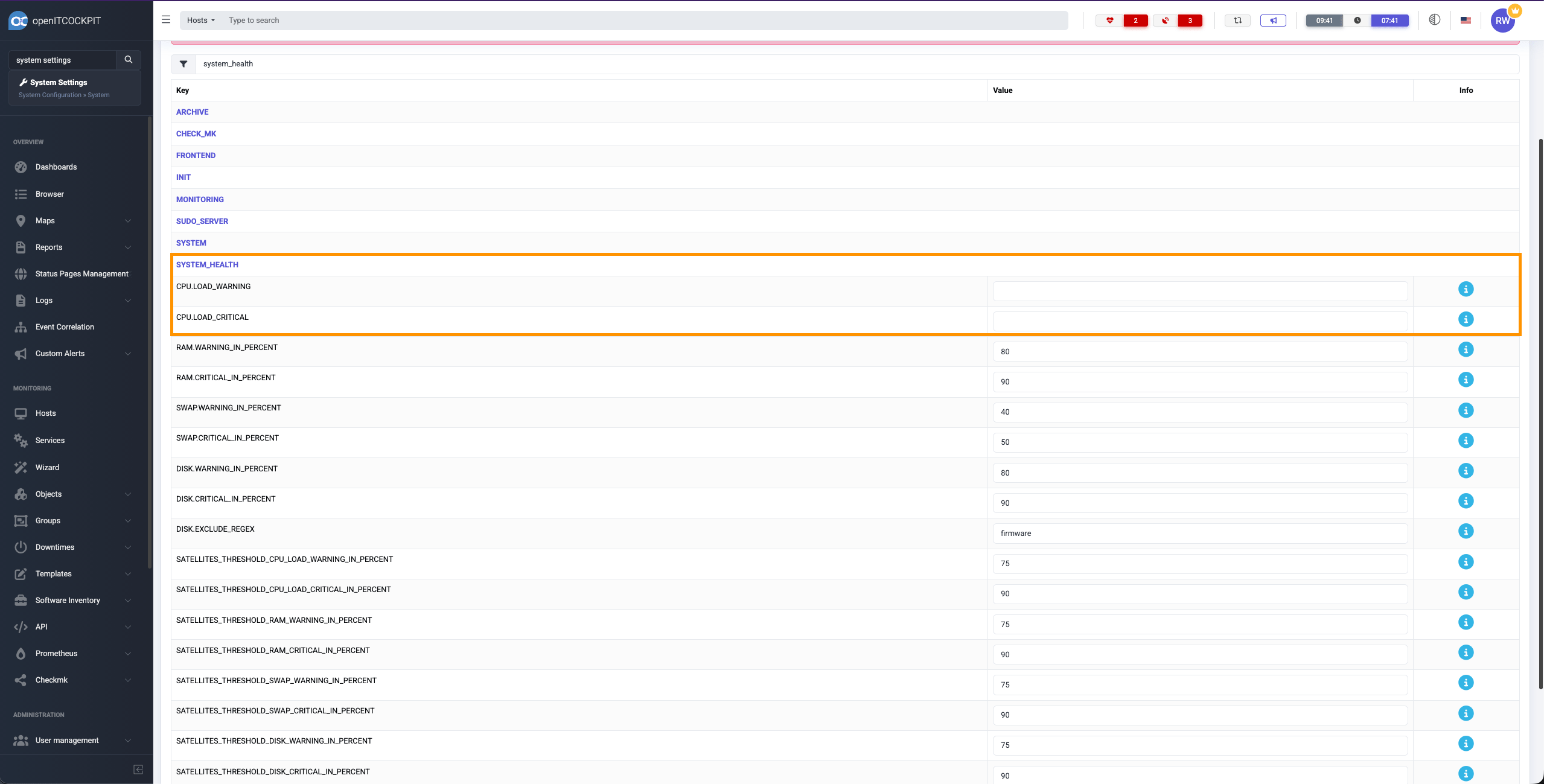
The System Health of openITCOCKPIT got a significant update in this release, allowing for more precise monitoring and configuration of system performance metrics. System Health provides a quick overview about the openITCOCKPIT system’s health status itself. It will only look at the core system metrics and inform the user in case an issue is detected.
A breaking change are the values of CPU.LOAD_WARNING and CPU.LOAD_CRITICAL, which are now expressed as percentages instead of absolute values. Please make sure to check your current configuration
and adjust them accordingly to reflect the new percentage-based thresholds. We made this change, as all other values of the System Health are already percentage-based. Also this gives a more consistent and intuitive understanding of system load across different systems and hardware configurations.
In addition, it is now possible to configure thresholds for Satellite Systems as well. Via the DISK.EXCLUDE_REGEX setting, you can exclude specific disks from being considered by the System Health check.
Import Module: ManageEngine Applications Manager
The Import Module does now support ManageEngine Applications Manager as external Monitoring System. openITCOCKPIT can query and collect the status and metrics from different monitoring systems,
to provide a unified view of the monitored environment.
You can learn more about the Import Module and the umbrella monitoring capabilities of openITCOCKPIT in the official documentation.
Telegram Module
Via the Telegram Module, openITCOCKPIT can send notifications directly to your Telegram account. In addition it is possible to acknowledge alerts directly from Telegram. Information about how to setup can be found in the documentation.
Many thanks to Timo Triebensky for contributing this module.
Graph shows historical data
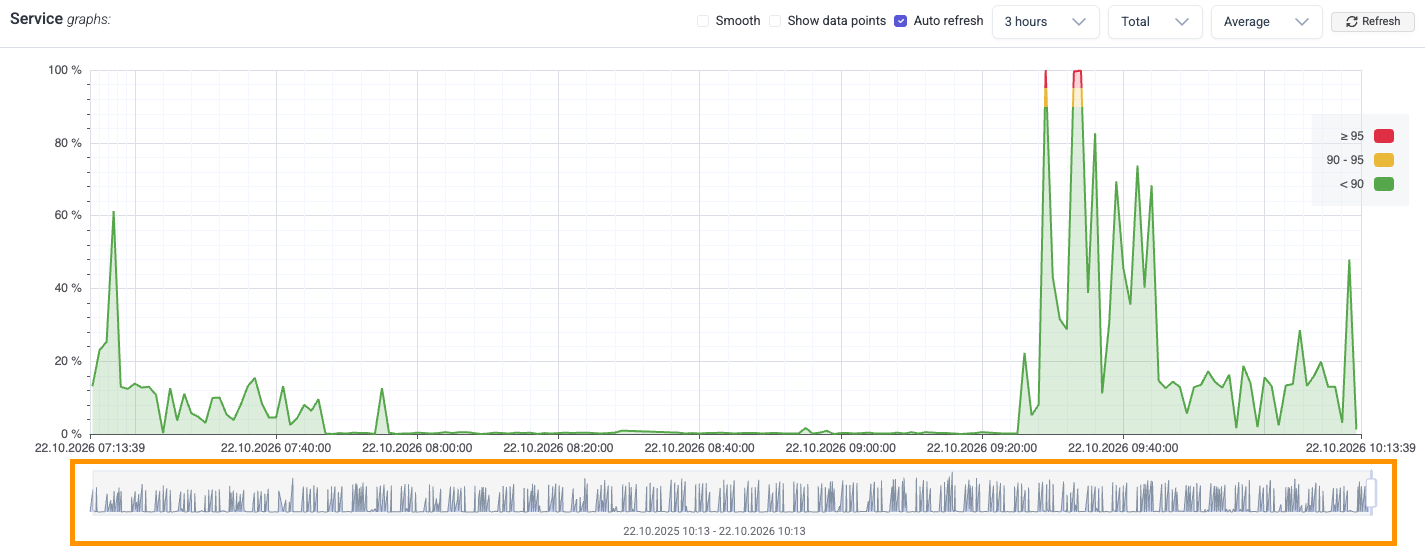
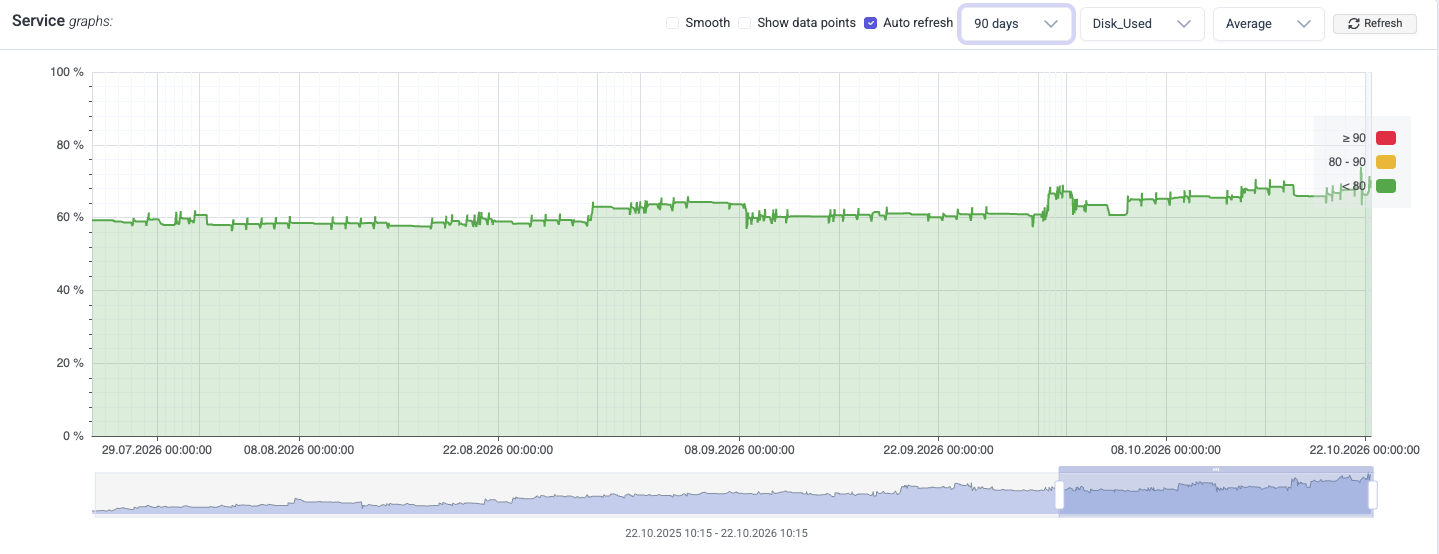
openITCOCKPIT collects metrics over time and stores them by default for one year. The Charts in openITCOCKPIT will display by default only 3 hours of historical data, so that a current event will be visible immediately. We added a second Chart to our main Graph to display the historical data over a year. This will help to identify if a issue is appearing repeatedly over time, growing over time (like the disk usage) or a sudden spike in the metrics.
The following Chart will display the CPU Usage of a build system. The long-term chart will clearly show, that the CPU usage follows a pattern and repeats in regular intervals.
The disk usage of the system is also rising. But this does not follow a clear pattern, the disk usage increases gradually over time.
Angular 22
The openITCOCKPIT web interface has been updated to Angular 22. The Angular framework has a short life cycle, and keeping it up to date ensures better performance, security and access to the latest features. If you are interested in Angular versioning and releases please see the official Angular documentation.
New service templates for the openITCOCKPIT Monitoring Agent
We are currently working on a large update for the openITCOCKPIT Monitoring Agent. This release will already prepare you openITCOCKPIT Server with the latest service templates and check plugins, so you will be ready to use all the new monitoring capabilities of the updated Agent, once it is released.
Of course, the new Agent version will be fully backwards compatible with older versions of openITCOCKPIT and vice versa.
Checkmk
There was a known issue with Checkmk, which requires an configuration refresh after an reboot of the openITCOCKPIT server. This issue got resolved. Also, the etc directory for Checkmk
is now mounted read-only in the Checkmk Docker container. This will prevent accidental modifications as openITCOCKPIT itself is the source of truth for the configuration files.
Changelog
For a complete list of new features, bug fixes, and improvements, please see the changelog.
How to Update
To ensure that the apt will replace and upgrade all packages correctly, it is important to use apt-get dist-upgrade.
Please see the official documentation for instructions on how to update openITCOCKPIT.
Refresh of monitoring configuration
After updating openITCOCKPIT, it is recommended to refresh your monitoring configuration to ensure all changes are applied correctly.
Your openITCOCKPIT Team